
Twitch chat, with a little more yap.
YappyChat is a fast, friendly Twitch chat client for Windows. Read every channel in one window, moderate in one click, and let Yappy point out trouble before it spreads.
- Readevery channel, every emote
- SpotYappy flags spam and raids
- Actdelete, time out, ban: one click
- Undochange your mind any time
You're the mod. Hover or tap a message for delete, timeout and ban. Cleaned up: 0
Set up in about two minutes.
No account to make, no settings to learn first.
- 1Download and open YappyChat
A normal Windows installer. It updates itself in the background.
- 2Log in with Twitch
Approve YappyChat on Twitch's own page. Tick "I only chat" if you don't moderate, and it asks for fewer permissions.
- 3Add your channels
Up to 50. Split them side by side, snap the stream where you like it, and you're done.
Everything you need to run a busy chat.
Three things YappyChat does better than a browser tab.
Chat that's easy to read
- Every emote: Twitch, 7TV, BetterTTV and FrankerFaceZ, with a search-as-you-type picker.
- A colour for every channel, and its own sound. Tabs flash when they need you.
- Split view your way: up to six chats, one big and four small, the stream snapped on any side.
- Streaming together is shown automatically, with each message's channel.
- GIFs, pinned messages and drops in the line, each with a dismiss button.
- Colour-vision modes and seasonal themes, or a flat, fast Minimal look.


Moderate in one click
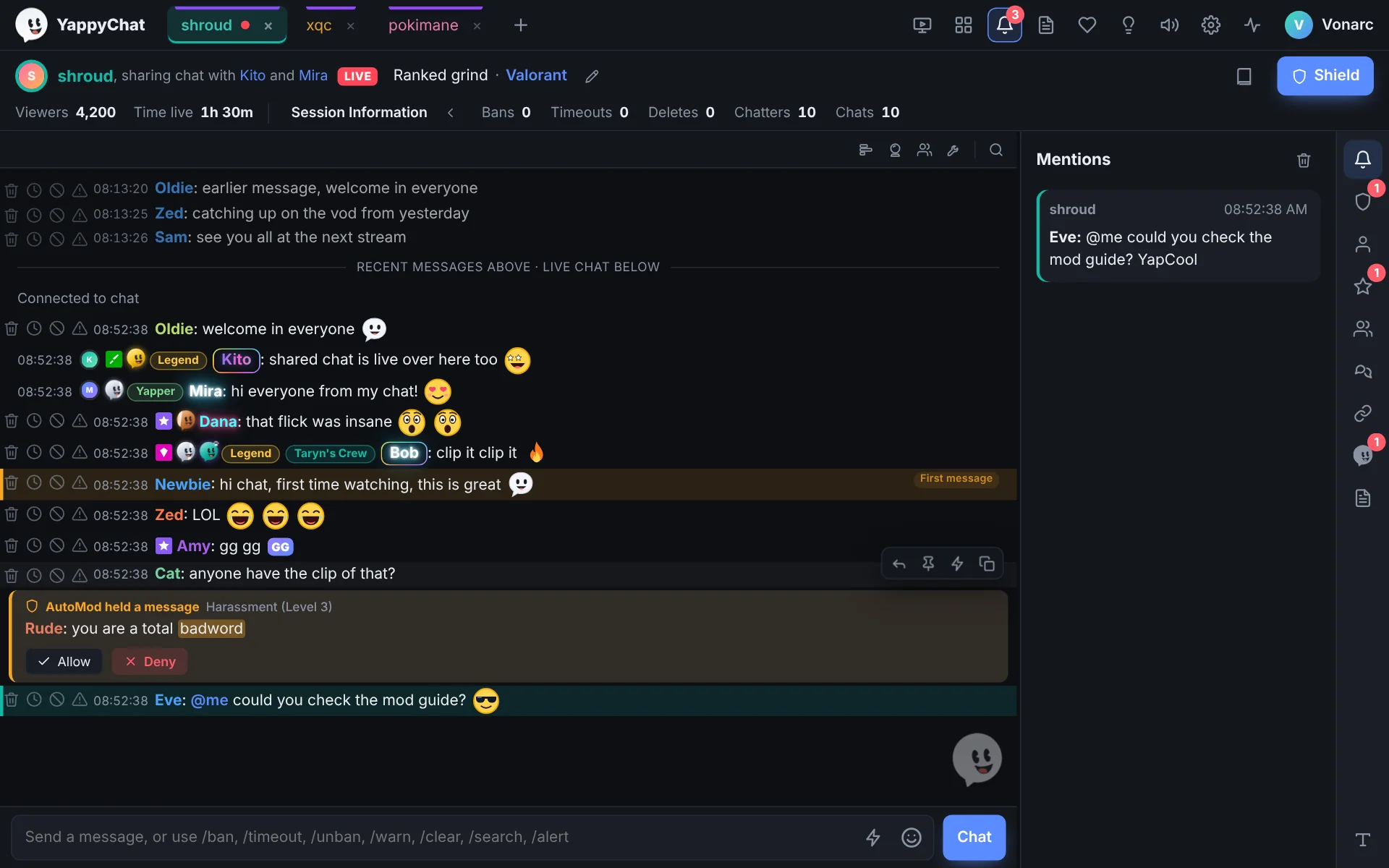
- Delete, time out, ban and warn beside every message, or from the keyboard (Alt+Up, then D, T or B).
- The activity rail catches mentions, AutoMod holds, unban requests, first-timers and whispers.
- AutoMod in the chat line, with the flagged words highlighted. Allow or deny in one click.
- Undo a ban or timeout from the mod feed, which says who did what.
- Conversations and /search: see what two chatters said to each other before it turns into a fight.
- Channel notes and rules, a click away, saved per channel.
Yappy, your chat buddy
- Speaks up when it matters: a spam wave, a likely raid, a word you keep deleting, a whisper.
- Never acts without your click. Everything he says is saved in the activity panel.
- Sits beside the Chat button, or anywhere you drag him. Hide him and keep his notices, or switch it all off.
Made for everyone in chat.
Moderators
Fewer clicks for every decision, and nothing that needs one gets missed: AutoMod, unban requests and first-timers wait for you in the activity rail.
Moderating with YappyChatStreamers
A dashboard for chats, mod actions and viewers, and /alert so your mods can reach you mid-game. Streamer mode hides the window from capture.
Viewers
All your channels and emotes in one calm window, with colours, themes and live alerts. One switch hides every moderator tool.
Just here to chatBuilt on Twitch's official API.
No scraping, no private endpoints, no browser tricks. YappyChat talks to Twitch the way Twitch asks apps to.
- Your login stays on your PC, encrypted with Windows' own protection. Twitch checks it when the app starts and every hour.
- Only the permissions it needs. Extra tools ask for their one permission when you first open them.
- Rate limits respected: when Twitch says slow down, YappyChat waits instead of retrying blindly.
- Twitch's own player for streams, unmodified and at least 400x300, as the embed rules require.
See it in action.
Why we built it and how it works, in 90 seconds. Then the real thing.
The whole app is free.
No trial, no ads, no locked moderator tools. Perks are optional and only change how you look.
Patch notes
What's new in 0.13, newest on top.
- A real checkout for perksPay with a card, Apple Pay, Google Pay or PayPal after signing in with Twitch. Perks switch on within seconds, and refunds are simple.
- Fewer Twitch permissionsLogin asks only for what everyone needs. Tick "I only chat" to skip the moderator ones, and extra tools ask for their own permission when you open them.
- Moderate from the keyboardAlt+Up picks a message, then D deletes, T times out, B bans, R replies. Screen readers read each message out.
- Safer loginsYappyChat checks your Twitch login every hour, as Twitch asks, and reconnects to chat more gently when the internet drops.
- Crash reports you controlA diagnostics log on your PC, with tokens removed, and an opt-out in Settings > Account.
- Lighter when idleHidden Yappys stop animating, and pinned messages are only checked for chats you can see.
Earlier updates
- Chats snap around the streamDrag a chat to any side of the stream, even when it's the only one open.
- Any split layoutOrder your chats however you like, including one big chat and four small ones.
- Yappy sits beside the Chat buttonHe matches the button's height. Drag him out and the message bar takes the full width.
- A message box in every chatTurn it on in Settings > Chat. The main bar, where Yappy lives, stays.
- GIFs, pins and drops in chatSent GIFs, pinned messages (shown as pinned while you're watching) and drops, each with a dismiss button.
- Community panel, your wayAn arrow button moves it above or below the chat, or to the left or right in a horizontal layout.
- Fold the activity panelClick the open icon again to close it and shift everything back.
- Everything sits above the streamReply bars, autocomplete, dialogs and lists no longer hide behind the stream window.
- Perks preview and an Easter tailThe preview now stays in view as you browse, shows Yappy in a box, and has a round reload button. The Easter bunny's tail moved to the other side.
- Holiday entrances and Yappy skinsPlus a message box that names the channel, and suggestions that reach the developer.
- Community listEveryone in chat, like Twitch's own Community tab: broadcaster, moderators, VIPs and viewers.
- Up to four streamsStreams and chats share six panes, and every video stays at least 400x300 as Twitch requires.
- Streamer dashboard and /alertNumbers for you, a big impossible-to-miss message from a verified moderator.
- Themes, security and startupFour seasons and holidays, passcode lock, hide from screen share, and start with Windows.
Ready for a calmer chat?
Free for Windows. Log in with Twitch and your channels are there in a minute. Streamer or mod team? Let's make something together.